


Produk Laptop kecil (atau istilah yang dipopulerkan oleh ASUS adalah Netbook ) yang saya gunakan adalah seri HP Mini 1001 dengan spesifikasi Intel Atom N270, 10 inch, Hard Disk 60 GB, RAM 1GB, Camera, Bluetooth, Wi-Fi dan tersedia Card Reader.
Karena saya termasuk pengguna Ubuntu OS , terpikir untuk melakukan instalasi Ubuntu pada netbook HP Mini 1001 saya teresebut. Kebetulan juga belum lama dirilis versi terbaru dari Ubuntu dengan nama Ubuntu 9.04 (Jaunty).
Karena Netbook tidak dilengkapi fitur Optical Drive muncul pertanyaan saya bagaimana cara merubah format ISO Ubuntu OS tersebut agar dapat dijalankan di dalam USB removable disk yang saya gunakan, dan ternyata Pengembang Ubuntu sudah memikirkan hal tersebut dari jauh-jauh hari, terbukti dengan kesediaan paket Ubuntu Netbook Remix bagi para pengguna Netbook yang ingin menggunakan Ubuntu tanpa perlu membakar ISO filenya ke dalam CD/DVD, berikut saya berikan langkah-langkah yang harus dijalankan ketika akan melakukan proses instalasi Ubuntu Jaunty 9.04.
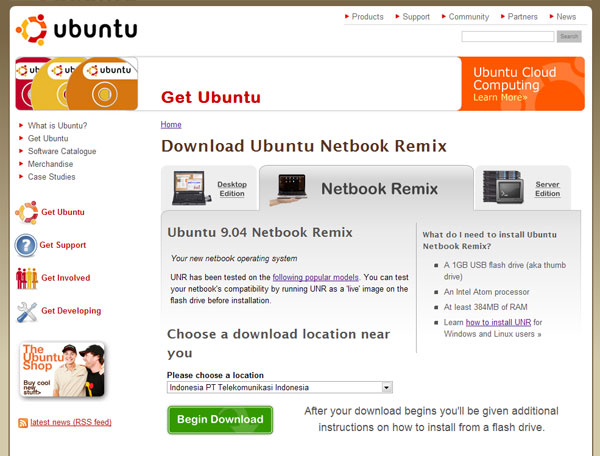
1. Download Ubuntu Jaunty Paket Netbook Remix pada link berikut :http://www.ubuntu.com/getubuntu/download-netbook, kemudian pilih Tab Netbook Remix, pilih lagi lokasi download yang terdekat dengan lokasi tempat tinggal masing-masing, kemudian klik tombol “Begin Download”.
Gambar berikut semoga memberikan kemudahan pemilihan sumber untuk mendownload ubuntu.
2. Setelah proses download selesai, langkah berikutnya adalah memindahkan atau merubah file image tersebut menjadi format bootable USB installaer untuk Ubuntu. Caranya sangat mudah, dengan menginstall aplikasi Win32 Disk Imager pada website berikut : https://launchpad.net/win32-image-writer/+download
dengan langkah pada gambar di bawah ini :
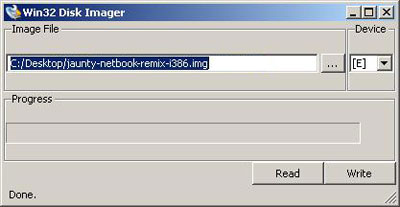
3. Langkah berikutnya adalah menentukan lokasi image yang sebelumnya sudah didownload pada aplikasi Disk Imager dan jangan lupa untuk memasukan USB Removable yang anda gunakan.
Jika tahapan-tahapan di atas sudah anda laksanakan, maka proses instalasi akan dapat dilaksanakan, berikut adalah tangkapan layar yang sempat kami publikasikan pada saat Ubuntu Netbook Remix sudah terinstall.
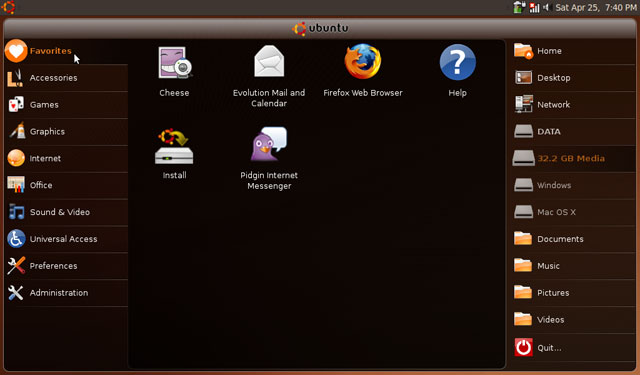
Ternyata tampilan Ubuntu Netbook Remix memiliki perbedaan dengan versi standartnya, dan yang pasti lebih menarik. Yang tak kalah pentingnya Wi-Fi, Bluetooth, Card Reader, Camera pada HP Mini 1001 TU berfungsi semua. Selamat mencoba.
Sumber : blog.micokelana.com
This page lists some of the netbooks that have been tested with Ubuntu Netbook Remix 9.04, along with any known quirks or issues experienced during testing.
Tier 1
These are netbooks that work reasonably well, with few or any issues, and no major issues
Acer Aspire One
Works well for most things, sound, webcam, ports all reported to work correctly. Minor problems include pulseaudio interfering with sound recording, and media card reader issues unless it is booted with a card in the slot.
Known issues:
271019 – media card reader not hotpluggable on acer aspire one
354620 – Recording from microphone stutters when pulseaudio is running
Asus Eee 1000H
Works very well with sound, webcam, ports all reported to work correctly. Minor problems include pulseaudio interfering with sound recording.
Known issues:
354620 – Recording from microphone stutters when pulseaudio is running
Asus Eee 1000
Works very well with sound, webcam, ports all reported to work correctly. Minor problems include pulseaudio interfering with sound recording.
Known issues:
354620 – Recording from microphone stutters when pulseaudio is running
Asus Eee 900a
Works very well.
Asus Eee 901
Everything works well apart from the sleep button, wireless on/off button, special-purpose buttons, and problem with wireless connect.
Known issues:
339891 – wireless rt2860 not connecting to some WPA (Enterprise does not work out-of-box). Working patch is issued at link.
Axioo PICO DJJ
Works very well.
Dell Mini 9
Works very well, Minor problem with pulseaudio interfering with sound recording.
Known issues:
354620 – Recording from microphone stutters when pulseaudio is running
370046 – Cannot set wireless regulatory domain (in order to access wifi access points on channels 12 and 13)
Dell Mini 10v
Works very well; WiFi, webcam, sound, 3D graphics, USB, touchpad worked “Out of the box”.. Minor problem with Microphone not working with pulseaudio, might just be settings.
HP Mini 1033cl
Everything works “out of the box”; wifi, webcam, hotkeys, 3D Graphics, sound, USB, touchpad, mic, etc.
At least one user has reported that Wi-Fi did not work out of the box.
HP Mini 2140
Works very well; video, bluetooth, sound, touchpad, webcam and even hotkeys work without modification.
On some models (FM839UT at least):
internal microphone doesn’t work out of the box. Workaround in filed bug 376795
enabling dual-core support for hyperthreading doesn’t work out of the box. Workaround in filed bug 376728
detection of lid close doesn’t work. Filed bug 376793
Lenovo S10
Works very well.
Known issues:
344627 – Recording from the internal microphone does not work
Medion Akoya E1210
Works very well. Sound, wireless, ports, suspend, hibernate and hardware function buttons all reported to work correctly.
MSI Wind U100
Works very well.
MSI Wind U90
Works very well.
Compaq Mini 701ES
- Works very well: Wireless, suspend, hardware function buttons, sd card reader, bluetooth, webcam, power management (incl. screen dim, freq scaling,…)
sound doesn’t work out of the box see https://bugs.launchpad.net/ubuntu/+source/linux/+bug/318942 .
Ethernet port: Needs acpi_os_name=Linux passed as a kernel parameter; See https://bugs.launchpad.net/ubuntu/+bug/297263
- Wifi needs non-free driver, but works out of the box.
Compaq Mini 730EO
- Works extremely well, almost everything works out of the box and as intended even special keys (incl. turning on/off wireless), sound up and down with Fn keys, suspension works flawless and screen dimming etc.
Sound out of speakers doesn’t work but solution found at 318942 – no sound from speakers on HP Mini 1000 (hda-intel, IDT 92HD75B2X5) (Compaq Mini 730 is more or less the same as HP Mini 1000 just sold in the EU instead under a new name and minor changes)
Tier 2
These are netbooks that work somewhat, but have problems that may interfere with typical activities at the moment, or many smaller issues.
Asus Eee 1000HE
Wireless with 9.04 NBR has issues. The wireless connection sometimes goes off and on, will connect only after multiple attempts, and grab weak signal strength unless extremely close to the router. Installing backports can fix the connection issue but the signal strength problem remains. This model of EeePC uses different hardware than the Asus Eee 1000.
Known issues:
378156 – UNR Ath9K unstable connection
Asus Eee900
Works reasonably well with the current betas of Jaunty, but some minor issues such as sound recording not working. One fairly annoying bug with the interface being very sluggish. A patch and updated kernel are available that can be applied for now, or wait until after release when it should hopefully become available quickly through the normal update process.
Known issues:
354685 – Volume hotkeys take a long time to react with Rhythmbox
354707 – [Jaunty] Microphone doesn’t work at all on Eee 900
349314 – Slow performance and tiling issues on i915 – look here for kernel hotfix
Asus Eee 701-SD / 702
This netbook basically works, but most of the problems with it center around the fact that it has a very small screen with a default resolution of 800×400 and many apps simply won’t scale down to that size. Known issues:
https://bugs.launchpad.net/ubuntu/jaunty/+source/linux/+bug/349314/ – Slow performance and tiling issues on i915 video chipset
354681 – Totem takes more space than available on Eee 701SD
354683 – Rhythmbox takes more space than available on Eee 701SD
354685 – Volume hotkeys take a long time to react with Rhythmbox
354705 – [Jaunty] Microphone doesn’t work at all on Eee 701SD
354710 – Display preferences takes more space than available on a Eee 701SD
232170 – Wireless Hotkeys Do Not Function Out-Of-The-Box. A patch is available, however it looks like it hasn’t made it into the released kernels yet. This can be fixed manually by downloading and installing linux-image-2.6.28-8-generic_2.6.28-8.27~lp232170apw1_i386.deb. Finally you need to ensure the rfkill-input module is loaded. To do this automatically on boot do this:sudo echo rfkill-input >> /etc/modules
Desktop performance of netbook-launcher is slow using the default settings. To fix this launch gconf-editor and enable /apps/netbook-launcher/force_low_graphics.
Already fixed bugs:
354687 – Evolution setup assistant takes more space than available on Eee 701SD – fixed in Jaunty
Axioo CMPC
Basically works using Jaunty both on live-flash and installed to harddisk. All hardware works. Hibernate (S2D) works, but suspend (S2R) doesn’t before patch in bug 370778 applied. Many dialogs still too tall for it’s 800×480 display.
370778 – Axioo CMPC display stays blank after resume from suspend
HP Mini 1000
Jaunty UNR works on the HPMini, including wireless. However there is a known bug with audio not working at the moment.
318942 – no sound from speakers on HP Mini 1000 (hda-intel, IDT 92HD75B2X5)
Kohjinsha SH6
Basically works using Jaunty UNR both as a live session and installed. Sound, video, external buttons, wireless is working. Touchscreen is working but the built-in Touchscreen Calibration tool does not work with it. The screen also does not come back after closing the lid or when it turns off for power saving.
After installing the Penmount driver, the sound rocker will stop working. This can be solved by removing the AddAutoDevices section in xorg.conf. No side-effects so far. See this thread for details.
317094 – lshal output for touchscreen
Samsung NC10
Problems with suspend and resume, and with sound recording. Known issues:
340014 – Samsung NC10 fails suspend/Resume tests
362373 – Sound recorder does not work in Samsung NC10 on Jaunty
Toshiba NB100
System keys are working. Most probably moved to Tier-1 after all test done.
[Ross] You may find issues with booting/installing UNR from a USB pen drive. Upgrading the BIOS to version 1.90 resolved this in my case, however be warned that it resets your BIOS settings. This may result in a BSOD in XP if you are dual booting and have changed from AHCI to compatibility mode (changing it back to compatibility fixed it).
Tier 3
These are netbooks that have been tested and are known not to work at the moment.
HP 2133 Mininote
Almost non-usable because of weak VIA Chrome9 videocard support in Ubuntu. Software rendering of UNR interface is painful. Also there are minor problems with non-working mic, unstable falling into suspend and wi-fi not always waking up after resume. Known issues:
358793 – UNR jaunty: Slow interface, high CPU load
365688 – Mic doesn’t work in jaunty for VIA VT1708 High Definition Audio
233920 – Sleep on lid close work only 1 time
359291 – Broadcom wi-fi card doesn’t work after suspend/hibernate
355918 – resolution problem starting X with the wlan network controler activated
[Dirk-Heine Hofstede] I installed it at my HP mini-note 2133, and except that the UNR interface reacts slow I didn’t encounter any problems so far. My wi-fi card just ran normal and made connection again after I woke my mini up(I have done this only once yet). I didn’t use the build in microphone yet, so I can’t say anything about that.
Taken from : https://wiki.ubuntu.com/HardwareSupport/Machines/Netbooks


0 komentar:
Post a Comment